
WebAssembly PDF Compression with Ghostscript (2026)
I compressed a 24MB PDF to 3.9MB in the browser using Ghostscript compiled to WebAssembly — the mental model and four concepts to build it yourself.

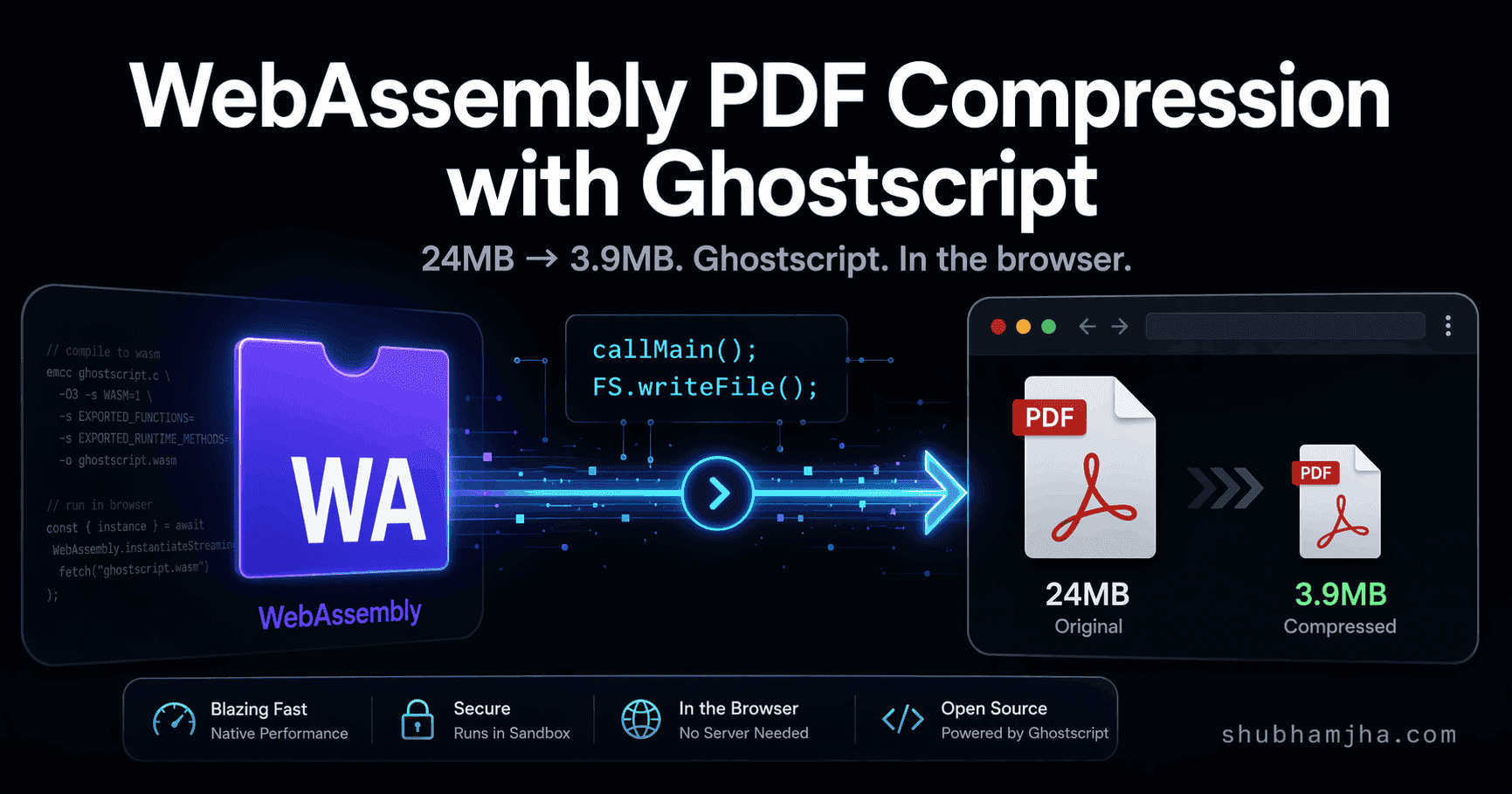
A 24MB PDF. Four seconds. 3.9MB output. No server, no upload, no cloud API — just a browser tab running Ghostscript.
When I first got this working I assumed I'd done something wrong. JavaScript can't do that. Except it wasn't JavaScript doing it. It was a 30-year-old C program, compiled to WebAssembly, running its CLI interface unchanged inside a browser tab. That reframe is the entire mental model.
This post is that mental model: the four concepts that make it work, and the real code behind a PDF compressor that runs Ghostscript entirely client-side.
Table of Contents
- Why JS-only PDF compression has a ceiling
- The reframe: you're running a CLI, not writing WASM
- Concept 1 — the virtual file system
- Concept 2 — callMain(): the CLI in the browser
- Concept 3 — the locateFile hook
- Concept 4 — caching a 16MB binary with IndexedDB
- The full flow, end to end
- Quality presets: what the numbers mean
1. Why JS-only PDF compression has a ceiling
pdf-lib, jsPDF, PDF.js — all three operate at the PDF object level. Add pages, remove annotations, merge files, fill forms. What they can't do is touch the compressed data inside a PDF's content streams.
A PDF is a tree of objects. Embedded images are compressed byte streams, typically JPEG or CCITT for scans. JavaScript libraries can restructure that tree, but they leave the compressed streams alone. No access to the pixel data, no JPEG encoder, no font subsetter. To resample a JPEG you need to decode to raw pixels, resize, and re-encode — that pipeline needs libjpeg and libpng at the C level.
On a scan-heavy PDF (receipts, contracts, anything photocopied), a JS-only compressor gets 10–20% reduction at best. The images, which are most of the file, come out unchanged.
Ghostscript works at a different level. It decodes every content stream, resamples embedded images to a target DPI, recompresses with a specified JPEG quality, subsets fonts to only the glyphs actually used, and re-encodes. On the same scan-heavy PDFs where JavaScript stalls at 20%, Ghostscript's screen preset gets 70–85%.
That 24MB file from the opening: a multi-page scanned document. Four seconds. 3.9MB. In the browser.
2. The reframe: you're running a CLI, not writing WASM
Most WebAssembly tutorials start from scratch — write C or Rust, manage memory manually, define a foreign function interface. That's the hard path, and it's not what this is.
The easier path: take an existing C program, compile it to WASM with Emscripten, and call its main() function.
When Emscripten compiles a C program, it provides a full POSIX compatibility shim. Virtual file system, standard I/O, memory allocation, argc/argv. Ghostscript's main() receives command-line arguments exactly as it would on Linux or macOS — because as far as it knows, it is.
The Ghostscript CLI command for compressing a PDF looks like this:
gs -sDEVICE=pdfwrite -dPDFSETTINGS=/screen -dNOPAUSE -dQUIET -dBATCH \
   -sOutputFile=output.pdf input.pdf
That command runs in the browser, flags identical. The only difference is input.pdf doesn't come from disk — it comes from an in-memory virtual file system that Emscripten provides.
3. Concept 1 — the virtual file system
Ghostscript normally reads input.pdf from disk and writes output.pdf back out. That doesn't work in the browser — there's no file system, WASM modules are sandboxed.
Emscripten's answer is the Emscripten FS API: a virtual in-memory file system that Ghostscript treats as real. You write your PDF bytes in before the call. You read the output back out after.
// Convert the input File/Blob to bytes
const inputBytes = new Uint8Array(await pdfFile.arrayBuffer())

// Write into the virtual file system — Ghostscript reads from here
gsModule.FS.writeFile("input.pdf", inputBytes)

// Run Ghostscript (covered in the next section)
gsModule.callMain(args)

// Read the compressed output back from the virtual FS
const compressedBytes = gsModule.FS.readFile("output.pdf")

// Clean up — the virtual FS persists across callMain() calls
// Without this, files accumulate in memory on repeated compressions
gsModule.FS.unlink("input.pdf")
gsModule.FS.unlink("output.pdf")

// Wrap in a Blob for download or further processing
const compressedBlob = new Blob([compressedBytes], { type: "application/pdf" })
One thing I got wrong the first time: the virtual FS persists across callMain() calls. Compress ten PDFs without calling FS.unlink() and all ten input/output files pile up in memory. For a 24MB PDF that's 48MB of garbage per compression sitting there until the tab closes.
Also: during compression, input.pdf and output.pdf both live in memory at the same time. Peak usage for a 24MB input is roughly 50–60MB including Ghostscript's working memory. That's fine on desktop. On mobile it's worth knowing before you ship.
4. Concept 2 — callMain(): the CLI in the browser
With the input file in the virtual FS, you run Ghostscript by calling callMain() with an array of CLI arguments:
function buildGhostscriptArgs(
  inputPath: string,
  outputPath: string,
  options: { quality: "screen" | "ebook" | "printer" | "prepress" } = { quality: "screen" },
): string[] {
  return [
    "-sDEVICE=pdfwrite", // output format: PDF
    "-dCompatibilityLevel=1.4", // PDF 1.4 — broadly compatible
    `-dPDFSETTINGS=/${options.quality}`, // quality preset (see section 8)
    "-dNOPAUSE", // don't pause between pages
    "-dQUIET", // suppress progress output
    "-dBATCH", // exit after processing (no interactive mode)
    "-dSAFER", // sandbox: restricts FS access to virtual FS only
    `-sOutputFile=${outputPath}`,
    inputPath, // input file must be last
  ]
}

// Execute — this is synchronous and blocks until compression completes
gsModule.callMain(buildGhostscriptArgs("input.pdf", "output.pdf"))
callMain() maps directly to Ghostscript's int main(int argc, char **argv). The args array is argv. If you've used Ghostscript on the command line, these flags are familiar. -dSAFER is the one to pay attention to — it restricts file access to the virtual FS only, so Ghostscript can't touch the real file system through Emscripten's shim APIs.
callMain() is synchronous — it blocks the main thread until Ghostscript finishes, which on a 24MB scan is 3–5 seconds of frozen UI. Move it to a Web Worker before shipping. A frozen main thread is exactly what tanks INP, and this Core Web Vitals case study covers the same class of fix from the other direction: data fetching instead of compute.
5. Concept 3 — the locateFile hook
Before callMain() can run, the WASM module has to be instantiated. That requires fetching the .wasm binary — in this case ~16MB. By default the WASM runtime looks for it relative to the JS file that bootstrapped it, which breaks as soon as you're loading from a CDN or a cached blob URL.
The locateFile callback overrides this:
const ghostscriptModule = await createModuleFn({
  locateFile: (file: string) => {
    if (file.endsWith(".wasm")) {
      // cachedWasmUrl is a blob: URL created from IndexedDB — or null on first load
      return cachedWasmUrl ?? `https://cdn.jsdelivr.net/npm/@jspawn/ghostscript-wasm@0.0.2/${file}`
    }
    return file
  },
})
On first load, cachedWasmUrl is null so the runtime fetches from the CDN. On subsequent loads it's a blob: URL built from the ArrayBuffer stored in IndexedDB:
const wasmBlob = new Blob([cachedArrayBuffer], { type: "application/wasm" })
cachedWasmUrl = URL.createObjectURL(wasmBlob)
The WASM runtime can't tell a blob: URL from an https: URL. It fetches, parses, and instantiates from either. The 16MB CDN download becomes a fast in-memory read from the second visit onward.
blob: URLs from URL.createObjectURL() persist for the browser session, so call URL.revokeObjectURL(cachedWasmUrl) when the module is done to release the memory reference.
6. Concept 4 — caching a 16MB binary with IndexedDB
A 16MB WASM download on every page load isn't acceptable. IndexedDB is the browser's native key-value store for large binary data, and it's the right tool here. The TTL is 30 days.
On first load, stream the download so you can track progress, then store it:
async function downloadWASMWithCache(onProgress?: (loaded: number, total: number) => void): Promise<ArrayBuffer> {
  // Check cache first
  const cached = await getCachedWASM()
  if (cached) {
    onProgress?.(cached.byteLength, cached.byteLength)
    return cached
  }

  // Stream the download to track progress
  const response = await fetch("https://cdn.jsdelivr.net/npm/@jspawn/ghostscript-wasm@0.0.2/gs.wasm")
  const total = parseInt(response.headers.get("content-length") ?? "16777216", 10)
  const reader = response.body!.getReader()
  const chunks: Uint8Array[] = []
  let loaded = 0

  while (true) {
    const { done, value } = await reader.read()
    if (done) break
    chunks.push(value)
    loaded += value.length
    onProgress?.(loaded, total)
  }

  // Combine chunks into a single ArrayBuffer
  const fullData = new Uint8Array(loaded)
  let position = 0
  for (const chunk of chunks) {
    fullData.set(chunk, position)
    position += chunk.length
  }

  await cacheWASM(fullData.buffer)
  return fullData.buffer
}
The cacheWASM function just writes the buffer with a timestamp:
async function cacheWASM(data: ArrayBuffer): Promise<void> {
  const db = await openIndexedDB()
  const tx = db.transaction(["wasm"], "readwrite")
  tx.objectStore("wasm").put({ data, version: 1, timestamp: Date.now() }, "gs.wasm")
}
getCachedWASM reads it back and rejects entries older than 30 days:
async function getCachedWASM(): Promise<ArrayBuffer | null> {
  const db = await openIndexedDB()
  const tx = db.transaction(["wasm"], "readonly")
  return new Promise((resolve) => {
    const req = tx.objectStore("wasm").get("gs.wasm")
    req.onsuccess = () => {
      const cached = req.result
      if (!cached) return resolve(null)
      const thirtyDays = 30 * 24 * 60 * 60 * 1000
      if (Date.now() - cached.timestamp > thirtyDays) return resolve(null)
      resolve(cached.data)
    }
    req.onerror = () => resolve(null) // fall back to CDN on any failure
  })
}
IndexedDB can fail silently — storage quota exceeded, private browsing, corrupted store. The onerror handler resolves with null and the caller falls back to the CDN. That's the right behavior: slow first load, not a broken app.
7. The full flow, end to end
Here's how the pieces connect:
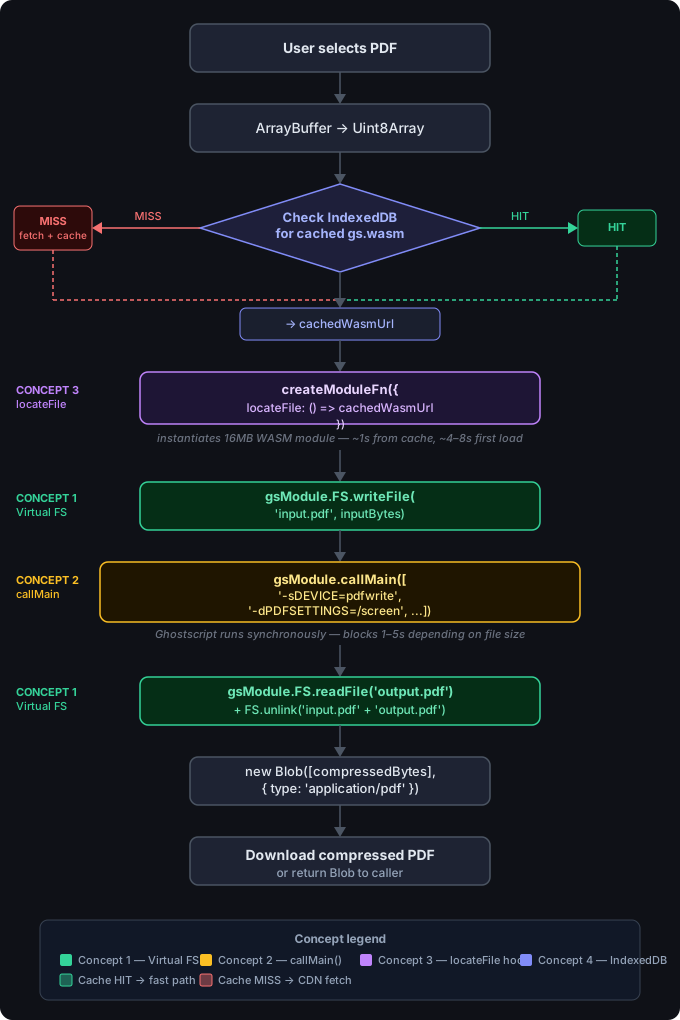
The function signature that wires these together:
async function compressPDFGhostscript(
  pdfFile: Blob | ArrayBuffer,
  options: { quality: "screen" | "ebook" | "printer" | "prepress" } = { quality: "screen" },
): Promise<{ success: boolean; data?: Blob; originalSize: number; compressedSize: number; compressionRatio: number }> {
  const originalSize = pdfFile instanceof Blob ? pdfFile.size : pdfFile.byteLength
  const inputBytes = new Uint8Array(pdfFile instanceof Blob ? await pdfFile.arrayBuffer() : pdfFile)

  // Validate PDF header
  const header = new TextDecoder().decode(inputBytes.slice(0, 8))
  if (!header.startsWith("%PDF-")) throw new Error("Invalid PDF file")

  const gsModule = await loadGhostscriptOnDemand()

  gsModule.FS.writeFile("input.pdf", inputBytes)
  gsModule.callMain(buildGhostscriptArgs("input.pdf", "output.pdf", options))
  const compressedBytes = gsModule.FS.readFile("output.pdf")
  gsModule.FS.unlink("input.pdf")
  gsModule.FS.unlink("output.pdf")

  const compressedBlob = new Blob([compressedBytes], { type: "application/pdf" })
  return {
    success: true,
    data: compressedBlob,
    originalSize,
    compressedSize: compressedBlob.size,
    compressionRatio: ((originalSize - compressedBlob.size) / originalSize) * 100,
  }
}
8. Quality presets: what the numbers mean
Ghostscript ships four named presets via -dPDFSETTINGS:
| Preset | Image DPI | Typical reduction | Best for |
|---|---|---|---|
/screen |
72 | 70–85% | Email attachments, web uploads |
/ebook |
150 | 45–55% | On-screen reading, tablets |
/printer |
300 | 25–35% | Desktop printing |
/prepress |
300 + colour profiles | 10–20% | Commercial press, print-ready PDFs |
The 24MB scan compressed to 3.9MB with /screen — 84% reduction. That's representative of scan-heavy PDFs. Text-heavy PDFs with few embedded images compress much less, because there isn't much image data to resample.
For most browser use cases (compressing before an upload, sending an email attachment), /screen is fine. If users will be reading the output on a tablet or need to zoom into diagrams, use /ebook instead — 150 DPI is noticeably sharper at scale.
You can also bypass the presets and set DPI and JPEG quality independently.
The compressor has been in production since early 2026 — you can try it at PDFCompressor.site, which runs Ghostscript entirely in your browser with no file uploads. The 24MB → 3.9MB number isn't cherry-picked — it's what /screen consistently does to scanned documents. Four concepts, each about 20 lines of code. The actual compression work was figured out three decades ago; we're just finally running it in the browser.
If you're building something that handles files client-side and want to talk through the specifics, reach out. For the broader question of keeping a Next.js app performant when it's doing CPU-heavy work like this, the scalable Next.js architecture guide is the right follow-on.
Frequently Asked Questions
Why is WebAssembly PDF compression better than JavaScript-only solutions?⌄
JavaScript PDF libraries can rewrite a PDF's structure but they can't resample images, subset fonts, or re-encode streams: the operations responsible for most file size reduction. Ghostscript, compiled to WebAssembly, runs the full C-based compression pipeline in the browser. That's why a JS-only compressor might cut 10–20% from a file while Ghostscript's screen preset cuts 70–85%.
How does Emscripten's virtual file system work in the browser?⌄
When a C program like Ghostscript is compiled to WebAssembly with Emscripten, it gets a virtual in-memory file system (Emscripten FS API). You write your input file into this FS with FS.writeFile(), run the program, then read the output with FS.readFile(). The real browser file system is never touched — all I/O happens in memory.
How do you cache a 16MB WebAssembly binary in the browser?⌄
Store the ArrayBuffer in IndexedDB after the first download. On subsequent loads, read from IndexedDB first — if the cached version exists and is under 30 days old, create a blob URL from it with URL.createObjectURL() and pass that URL to the WASM runtime's locateFile hook. The 16MB download becomes a fast local read from the second visit onward.
What are Ghostscript's PDFSETTINGS presets and what compression do they produce?⌄
Ghostscript ships four presets: screen (72 DPI images, ~70% size reduction — good for email/web), ebook (150 DPI, ~50% reduction — readable on screen), printer (300 DPI, ~30% reduction — print quality), and prepress (300 DPI with colour profiles preserved, ~15% reduction — press-ready). Screen is the right default for most web use cases.
Which browsers support WebAssembly for production use in 2026?⌄
All modern browsers: Chrome 57+, Firefox 52+, Safari 11+, Edge 16+. WebAssembly is available in over 95% of browsers in use globally as of 2026. The only meaningful check before instantiating a WASM module is typeof WebAssembly !== 'undefined', which covers the rare legacy browser without crashing.
Published: Fri Jan 16 2026